01.01 3D Modeling
3D modeling is the practice of describing three-dimensional form as a model or a representation that helps you think, communicate, test, and produce. Sometimes a 3D model is physical such a cardboard prototype, a clay study, or a foam mockup. More often 3D modeling refers to a digital, structured description of 3D forms stored by a computer so it can be edited, rendered, simulated, animated, or fabricated.
Digital 3D modeling is creation and editing of 3D form in a virtual three-dimensional space defined by Cartesian coordinates (X,Y,Z) and related math or data structures. X=0, Y=0, Z=0 written as (0,0,0), is the center or origin of the virtual 3D world. Digital 3D forms can be continuous smooth surfaces defined by equations or represented by discrete samples like triangles, points, or voxels. 3D modeling is used in many industries, including, art, animation, engineering, architecture, game design, physics simulations, virtual production, and digital fabrication.
What is a Model?
Before diving into modeling or specific software, we need to understand what a model is. A model is a simplified representation of reality designed to help us understand, communicate, manufacture, or manipulate complex ideas and objects. Every model balances accuracy, detail, speed, and usefulness.
In physics, the Standard Model of particle physics explains fundamental particles and forces in detail but is not helpful for calculation the load bearing strength of a bridge. In everyday problem solving, approximating earth’s gravity as 9.8 m/s2 (32 ft/s2) works for a skydiver timing a parachute pull but does not have enough detail for precise rocket trajectories. A weather model that attempts to simulate every molecule in the atmosphere may be accurate but way too complex to possibly calculate or use by meteorologists. In architecture, a 2D floor plan models the spatial relationships of a building without the need to draw every brick.
The point of a model is not perfection but to fit to the intended purpose. The key is choosing the right level of detail so the model is useful for your intended purpose and goal. Focus on the parts that matter and ignore what doesn’t.
How to Start 3D Modeling?
To get started now you can follow these guides depending on your interest. Try them out and then come back to read more about the conceptual and foundational processes of 3D modeling. The material on this page will still be here and may even make more sense if you have done a bit of 3D modeling.
- I’m here to 3D model to make stuff with 3D printing, Laser Cutting, and CNC.
- I’m here to 3D model, animate, and digitally sculpt in Maya or Blender.
- I’m here for 3D modeling for Virtual Production.
- I’m here to 3D scan.
- I’m here for 3D modeling to make architectural models from floor plans.
- I’m just curious.
- Keep reading.
3D Modeling Framework
Learning 3D modeling isn’t just learning how to make one object. It’s learning a repeatable process for turning ideas into form, especially when you don’t yet know what the final form should be.
Physical Models and Digital Models Share the Same Workflow
Physical and digital modeling are complimentary versions of the same workflow. The goal is to make an accurate representation of the forms and structure of the object and learn how these forms relate to one another.
A physical 3D model might be a quick paper mockup to explore proportion, a foam form to test ergonomics in the hand, or a rough welded armature to test balance and structure. Physical models are fast, tactile, and honest about gravity, structural, and material behavior. They also don’t require you to decide everything up front since you can improvise and respond. Often, physical 3D models will be prototypes of things that don’t exist yet. Physical 3D models usually are made at a larger or smaller scale than reality depending on the object modeled and the goal of the model.
Digital 3D models are fast to revise, easy to duplicate, and powerful for precision and variation. The software describes the location, shape, size, surface, and physical qualities of the objects. Digital models can be rendered, animated, measured, simulated, or sent to fabrication tools.
In practice, the best creative work often mixes both. You might block a form in cardboard and hot glue, test it, refine it digitally, and 3D print physical prototype iterations. Or you might model digitally, laser-cut a prototype, discover a structural failure while testing, and revise the digital model. The important skill is not “analog vs digital.” The skill is using iterative 3D modeling as an intent driven design and creative process.
Approaching 3D Modeling with Design Intent
Design intent is the process of how do we go from something that’s in our head to actually make it into our model.
Begin with references, constraints, and intent. The intent could be visual so that the model reads clearly on camera, or the intent could be physical so that the model bolts together and survives being used. Intents can and often overlap and must be balanced with resources.
Before modeling in 3D, you must be able to think and sketch in 2D. You do not need to become a mechanical drafter to model well, but you do need 2D to 3D spatial literacy. Explore in 3D first since WD sketching is one of the fastest ways to get ideas out of your head. Exploring and refining sketches can prevent wasting time valuable time creating unnecessary or poorly considered 3D models. The testing of ideas and concepts whether aesthetic or physical is essential.
Technical sketching and orthographic projection are useful because they force you to look at an object from the Top, Front, and Side without perspective distortion. This helps clarify proportion and structure. Even a rough, hand drawn orthographic sketch can reveal important information for decisions about alignment, symmetry, interfaces, and scale. That’s why basic fluency with technical sketching is and essential part of becoming skilled in 3D. It trains your brain to understand 3D relationships with precision, even when the drawing is quick and imperfect. Sketching also reduces the the tendency to stick with the first thing you think of and regretting it later. You can generate ten variations on paper before you commit to one direction in 3D.
The point of learning and practicing 3D modeling with design intent is not to produce a single perfect object. It’s to build a repeatable process for turning ideas into form We’re less interested in mastering all the intricacies of a particular piece of software then we are about having good ideas and sound processes.
Choosing the Goal then the 3D Modeling Method
Many beginners try to learn software. A better approach is to learn a repeatable modeling process that works in any software. Before opening software, define what the model is for, because different factors determine which method of 3D modeling method or software to use.
- What is The intended output of the model?
Consider if the target output is for visual consumption or physical fabrication or both. If your output is an image, animation, or realtime rendered scene, you’ll prioritize visual believability, clean shading, UVs, and performance. If your output is fabrication, you’ll prioritize real dimensions, manufacturable geometry, tolerances, assemblies, and “watertight” solids. If your output is simulation, you’ll prioritize correct structure and materials, not just appearance.
- Ideate by creating sketches based on existing references, your goals, and known constraints.
- Block out a rough model quickly to test proportions and assumptions.
- Test early: print, render, assemble, simulate, or prototype
- Iterate by revising your projects based on what the testing reveals.
- Only commit details when the direction of the form is relatively solid.
- Level of detail required
- Accuracy of form required
- Visual vs physical representation
3D Modeling Software
Software used for 3D-Modeling is often grouped into two buckets based on the intended final output, but real workflows blend categories. A strong modeler can switch tools easily because they understand the universal rules of geometry and 3D form. The specific software you use is just an interface. The underlying 3D thinking is what matters.
CAD - Computer Aided Design
The bucket of CAD (Computer Aided Design), focuses on 3D models, and designs that serve as a set of instructions for outputting physical objects into the real work. Architects use software that specializes in larger objects, photorealistic renderings and precise real world dimensions such as AutoCAD or SketchUp. Machinists or industrial designers use more traditional CAD software such as SolidWorks or Fusion 360 that feature precision, parametric modeling, and structural simulations.
Computer Aided Design (CAD) 3D modeling usually uses the solid method since it creates precise mathematical models of objects that can be produced in the real world. The solid object would be ready for digital fabrication such as 3D printing, laser cutting, or CNC machining. Solid modeling can not use the same visual tricks afforded to mesh modeling since a zero thickness wall that looks great in a render image, cannot be physically fabricated. Software can use exact dimensions and specifications from technical drawings to create precise machinable surfaces.
Surface Modeling
Surface modeling uses surfaces to create complex skins that are trimmed with other surfaces to become solids.
Constructive Solid Geometry CSG
Constructive Solid Geometry using boolean operations to combine and subtract from primitive solids to precisely add and carve away form to reach the desired result. Primitive solids include cubes, spheres, toroidal shapes, cones, and helixes.
Parametric Modeling
Parametric 3D modeling is a type of computer-aided design (CAD) that uses parameters to control the shape and geometry of a model. It can use parameters and variables to create models through a generative, parametric process. If you change a parameter such as Length = 100mm to 150mm, then the entire model updates automatically.
DCC - Digital Content Creation
The bucket of DCC (Digital Content Creation) focuses on output as an image or a pixel meant for visual consumption. Animators may prefer software with robust animation timelines and tools that aid in character rigging and animation special effects, such as Blender or Maya. Visual effects artists may use Houdini, Cinema 4D, and all of the above.
Digital Sculpting
Digital sculpting is a subset of polygon modeling but it uses intuitive sculpting techniques borrowed from the physical world rather than the sub-D polygon modeling technique. It is great for organic forms and quick ideation, but often needs retopology for clean animation or digital fabrication. Software can mimic the manipulating of physical materials like clay to create a model through a digital sculpting process.
Sub-D Modeling
Subdivision Surface, or Sub-D modeling, uses a low-resolution mesh cage to control a smoothed, higher resolution surface. The way the cage mesh is constructed with edge loops and edge flow determines how the smoothing algorithm smooths the mesh form.
Box Modeling is a form of Sub-D modeling that starts with a cube and extrudes faces to develop more complex forms.
Cheating, or making meshes that intersect, float in midair, or have zero thickness can be a skill since as long as the final output for the camera or the viewer looks good, how it is constructed is less important.
Procedural Modeling
Procedural Modeling uses algorithms and recipes to generate geometry and models based on specific actions. Great for patterns, environments, repetition, and systems.
Core 3D Modeling Techniques
The same looking object could be modeled with any of the 3D modeling techniques, but depending on the intended use of the modeled certain processes are more ideal. Different programs have different buttons, but most 3D form is built from a small set of fundamental moves and operations. Once you understand these core techniques, learning new software becomes mostly vocabulary and interface muscle memory.
- Extrude - Pulling a 2D profile into 3D space.
- Revolve - Spinning a 2D profile around an axis.
- Loft - Creates a skin that bridges multiple non-colinear 2D profiles spaced apart.
- Sweep - Dragging a 2D profile shape along a linear path.
- Transform - Move, Rotate, or Scale bodies or components in 3D space.
- Tessellation - Converts smooth, curves, surfaces, and faces, into discrete entities such as lines or polygons.
- Decimate - Reduces number of polygons based on level of retained detail and accuracy of original mesh.
- Boolean Operations
- Union - Adds A to B
- Difference - Subtracts B from A
- Intersect - Keeps only the parts of A and B that overlap in space
3D Reality Capture
Not all 3D modeling starts from scratch. Reality capture is a way to acquire 3D data, not a guarantee of a clean model. You still 3D model but start from a different kind of input than a cube or a blank file.
Photogrammetry
Photogrammetry software can stitch photos of an object taken from multiple angles together into a 3D model with applied visual textures. It can capture rich surface detail, but usually needs cleanup for fabrication or animation.
3D Scanning
3D Scanning can capture accurate information to create detailed 3D models from physical objects. 3D scanners uses sensors an methods such as structured light, LiDAR, and lasers. Scans can be extremely accurate, but still often require processing for alignment, noise reduction, hole filling, and retopology.
Fundamental 3D Modeling Concepts
3D Modeling Terms
Spatial Concepts
- Coordinate System - Locations in the virtual world are points defined by the X, Y, and Z axes.
- Global Space - The fixed world space with a fixed (0,0,0) origin and axes.
- Local Space - An object’s personal orientation. If a chair is rotated upside down, its local up points down at the ground but the Global Up still points up to the sky.
- Pivot Points - The specific spot an object rotates around.
- Origin - The (0,0,0) center point of the Global Space.
Surface Properties
- Normals - Direction that the polygon is facing or the direction a group of polygons is facing.
- UV Coordinates - Define UVs or how a 3D surface maps to a 2D image for texturing.
- Texture - 2D imagery projected onto a 3D surface based on UV Coordinates.
- Physical Based Rendering (PBR) - Rendering approach to represent surfaces and light based on the real world.
Model Quality
- Topology - The flow and layout of the polygon edges. Good topology often refers to using four sided polygons, or quads, that work well with Sub-D modeling, deformation for animation, and predictable edits.
- Manifold - Model must have clearly defined inside and outside and be closed.
- Watertight - No gaps in the mesh so that it would not leak if filled with water.
Types of 3D Geometry
3D geometry data is different than 2D geometry data. 2D geometry only captures height and width. 3D geometry adds the dimension of depth. 3D models generally create a representation of a volume of an object, often referred to as a solid, or a representation of the surfaces of an object referred to as a shell or boundary.
Computers store 3D shapes and geometry in different ways. Many types of 3D models are subsets of others and often they categories are arbitrary an overlap. In general there are two types of 3D models, those with continuous “infinite resolution” and those with discrete “finite” resolution.
Discrete Finite Resolution Models
Polygon Mesh Models
Polygon mesh models use polygons to create a shell or wireframe around the volume of the object.
A polygon is a closed 2D shape with minimum of 3 non-colinear points. These points are connected to form edges. When 3 or more edges connect to form a closed face, such as a triangle, square, hexagon, or many-many-agon, then it becomes a polygon. Every digital face has a “Front” and a “Back” indicated by its Normal Vector. If a Normal is flipped, the computer thinks the face is inside-out. This can cause lighting errors in renders and errors with modeling operations such as booleans. Generally it is best to ensure your Normals are facing outward. A mesh is a surface made of connected polygons. A quad refers to a four sided polygon face in a 3D model mesh.
At its basic form, a mesh model is 4 parts, 3 vertices that make of the edges of the triangle face, and a normal vector, that indicates which direction it is pointed. In the file this is represented as a list of coordinate points (X, Y, Z) connected by straight lines with additional coordinate information about face normals, the way the polygons are pointed. A mesh sphere is an approximation, it is not actually round. It is more like a disco ball made of thousands of tiny flat faces. If you zoom in close enough, you will always see the jagged edges of the polygons unlike a CAD type model.
Video games, animation, or visual effects generally use the polygon mesh modeling method since these applications are more concerned with the outward appearance of the model rather than the model’s exact physical structure.
Point Cloud Models
A point cloud is a list of 3D points in space that may or may not have edges, or faces defined. Point clouds often have raw data collected from 3D scanners that does not have meaning for a model until interpreted by a software algorithm or user. Each point is stored with a (X,Y,Z) coordinate in space. Point clouds are a form of unstructured 3D data.
Volumetric Voxel Models
Volumetric models use voxels, 3D pixels that represent the volume of a form at a fixed or variable resolution. They represent the voxels all the way through the cylinder rather than just the equation of a cylinder or the outside faces of a cylinder. Used in simulations and medical data such as CT scans.
Gaussian Splat Models
Gaussian Splatting is a method of using “splats” or gaussian “smears” to rebuild a 3D scene rather than a mesh.
Continuous Infinite Resolution Models
BRep Solid Models
A boundary representation, BRep, is one or more surfaces joined together. Many CAD systems use a boundary representation to define a solid from mathematically precise surfaces that enclose its volume. For basic solid analytical geometry, spheres, torus, cubes, cones, cylinders, the software uses simple yet precise equations to represent the form. Instead of storing thousands of little triangles to create a sphere, the computer stores an equation: “radius = 10. A cylinder is an axis and a radius.
NURBS Surface Models
Non-uniform Rational B-Spline (NURBS) use basis splines (B-splines) to describe curves with splines and control points. Surfaces are interpolated between different NURBS. This is similar but different to Bezier Curves in a vector drawing program like Adobe Illustrator or Inkscape. NURBS have infinite resolution.
Physical Output from Digital 3D Models
Digital 3D models are great for visualization, ideation, experimenting with forms, simulation, VR, AR, video games, animation, and for archiving but are still not physical objects. Laser Cutting, CNC machining, 3D Printing, vinyl cutting, and water jet cutting are digital fabrication processes that create physical outputs and objects from digital 3D models.
For a polygon mesh object to be usable for 3D printing is must be “watertight” or manifold. This means that all parts of the mesh or shell of the object need to be aligned with no gaps. Otherwise the shell is just a conceptual, piece of digital wrapping paper that might look really cool in a digital render but won’t work for a 3D print.
Emerging Technologies and AI in 3D Modeling
Generative AI can synthesize 3D models from text prompts and 2D images by estimating a depth map from the image.
Neural Radiance Fields (NeRFs) use deep learning to create 3D models from multiple 2D images or sometimes even a single 2D image.
This article, The Pathway to the Metaverse Begins With 3D Modeling , in The Entrepreneur examines the upcoming metaverse and how 3D modeled assets will be essential for the metaverse to work. 3D modelers will need to create the 3D digital objects for now, but soon AI-Artificial-Intelligence will likely play a bigger role in the automatic creation of 3D digital objects. Currently AI is able to produce realistic 2D images and make crude 3D models from photographs. This capability will exponentially grow in the future.
3D Generative Model Progression
2025
- Trellis 2 by Microsoft - 4 Billion Parameter 2D to 3D generator
2022 - 2023
In 2022 Google demonstrated DreamFusion that created 3D models from text prompts. OpenAI also demonstrated Shape-E in 2023.
Google’s DreamFusion in 2022 1
OpenAI’s Shape-E in 2023 2. MIT License
2024
VFusion3D , released in July 2024 can generate 3D meshes from images in seconds.

3D Model from 2D image created with VFusion3D in 2024

3D Model from 2D image created with Tencent’s Hunyuan 3.1 in 2026
2025
In 2025 Hitem3D demoed Sparc3D that created high fidelity and detailed polygon meshes from 2D Images. Sparc3D demo on Hugging Face
2026
In 2026 Tencent updated its 3D generative model to Hunyuan3D 3.1 from the previously released Hunyuan3D 2.1. Hunyuan3D 2.1 Demo on Hugging Face Image to 3D mesh generator by Tencent. Official Hunyuan3D site
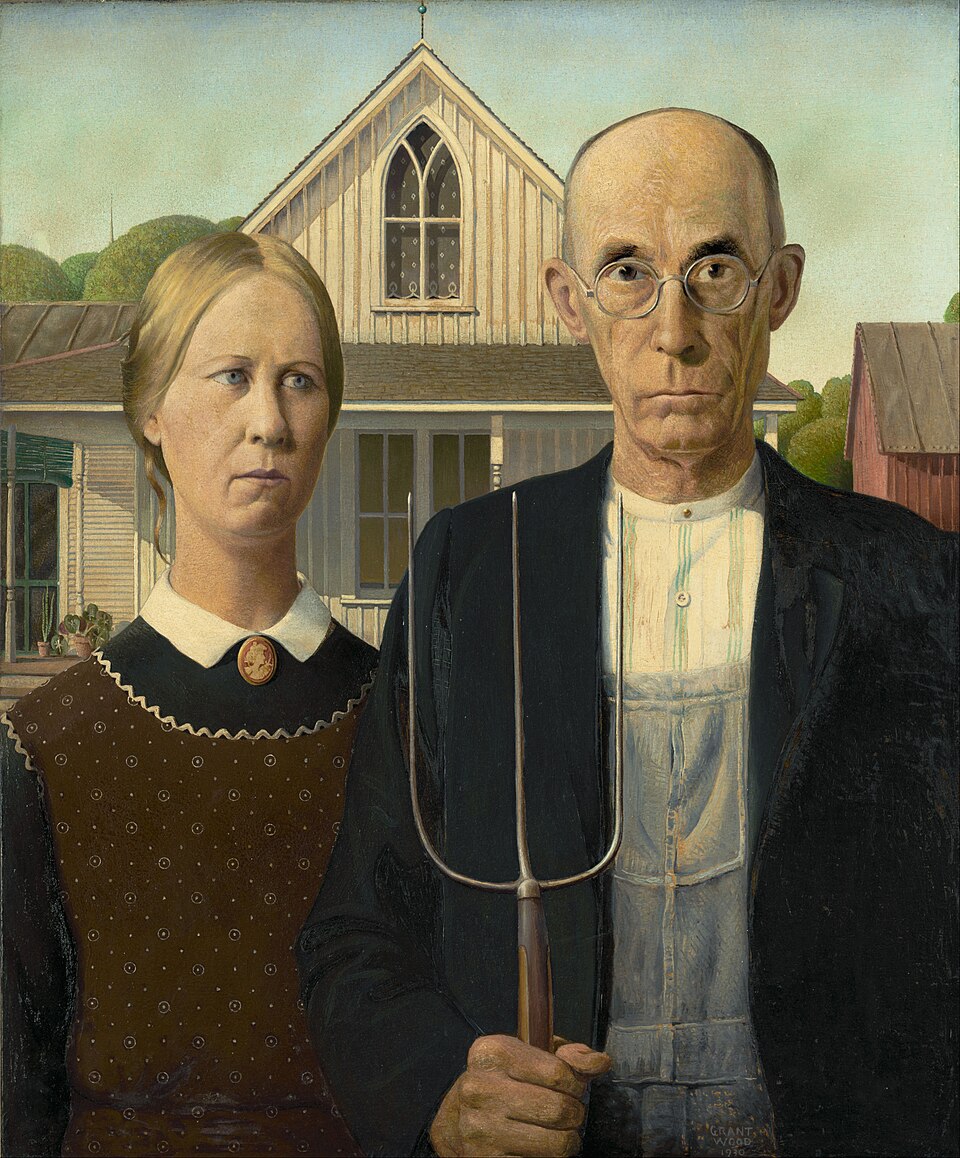
American Gothic Painting by Grant Wood 1930
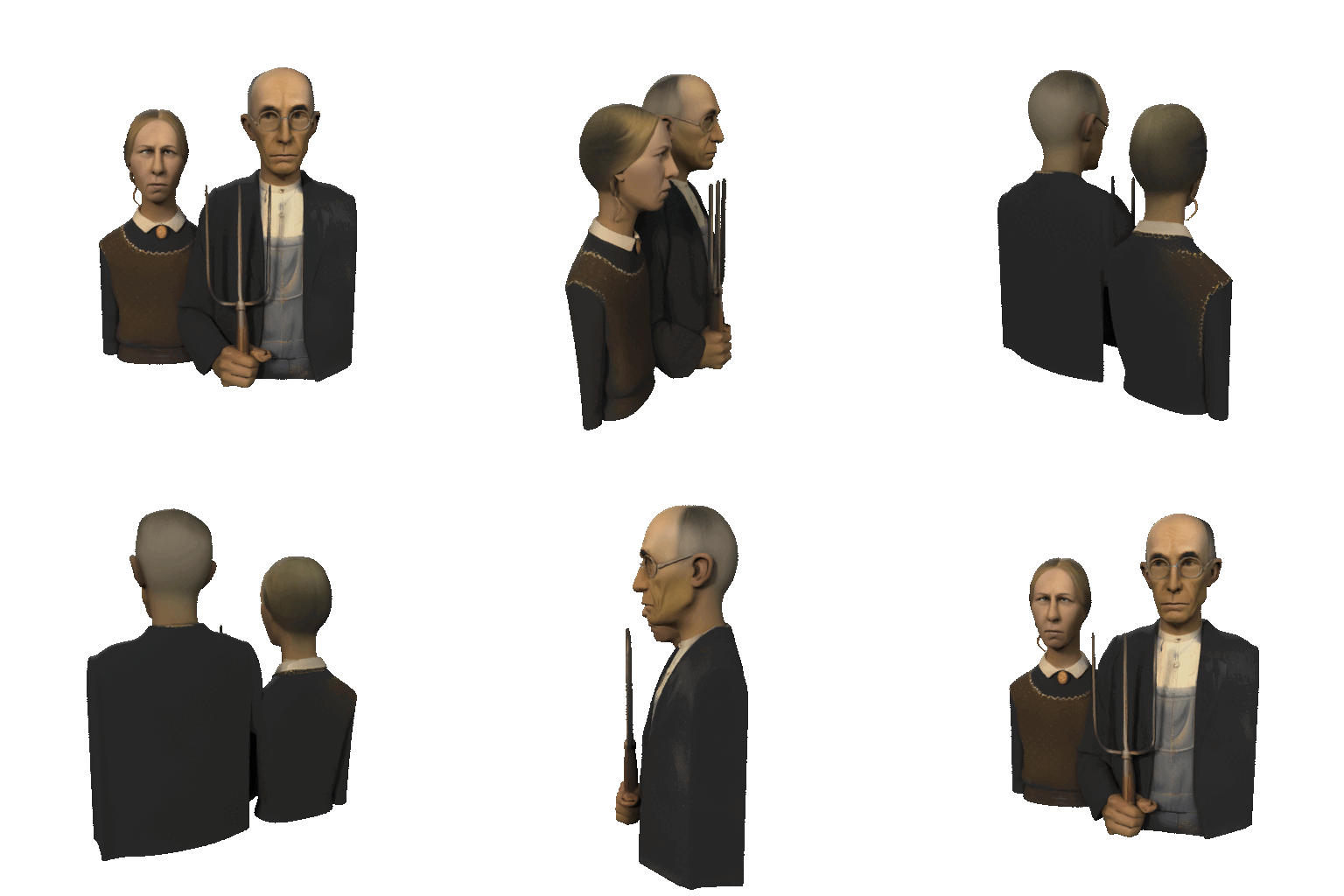
3D Generated model made with Tencent’s Hunyuan 3.1 model in 2026

Baccus by Carrivaggio

3D Generated model made with Tencent’s Hunyuan 3.1 model in 2026